
Sound model · ElevenLabs
ElevenLabs v4 on your Mac
Eleven v4 is the speech model ElevenLabs released in September 2026. In Tenet, the AI film studio for Mac, it's how a film gets its narrator and how a character gets lines to say, without leaving the project you're cutting.
The short answer
Yes, you can use ElevenLabs v4 on a Mac through Tenet. It sits in the model menu next to ElevenLabs v4 Turbo and ElevenLabs Turbo 2.5, all three turning text into speech with the same six voices: Sarah, George, Roger, Laura, Brian and Jessica. You pay with Tenet credits, so there's no ElevenLabs account to set up, and every line you generate can go straight onto the timeline.
ElevenLabs v4 in Tenet
| Made by | ElevenLabs |
|---|---|
| Versions in Tenet | ElevenLabs v4, ElevenLabs v4 Turbo, ElevenLabs Turbo 2.5 |
| Works from | Text you write (text to speech) |
| Voices | Six preset voices: Sarah, George, Roger, Laura, Brian and Jessica, the same six on all three models |
| Where it goes | Each line lands on your board, ready to drop onto a voice track on the timeline |
| Pays with | Tenet credits. A credit is a cent, and the app shows an estimate before you generate |
What ElevenLabs v4 is good at
Lines with feeling
ElevenLabs calls Eleven v4 its most emotive model yet, built on a new architecture. For a film that matters more than raw clarity: a narrator who sounds tired at the end of the story, or a character who sounds scared, carries a scene that a flat read would sink.
Dialogue and range
ElevenLabs describes v4 as handling multi-speaker dialogue, following inline audio tags such as [whispering], and speaking more than 90 languages. Those are ElevenLabs' claims for the model itself; inside Tenet you work with the six preset voices listed above.
Quick drafts with Turbo
ElevenLabs positions v4 Turbo as the low-latency version of v4, and Turbo 2.5 as a fast voice model. They're good for a scratch narration you'll rewrite five times before picture lock, then you run the final script on v4.
A voice to drive a face
A generated line is also the input a talking-head model needs. Feed it to OmniHuman or Kling Avatar and the character on screen speaks those exact words, in the voice you picked.
How to use ElevenLabs v4 in Tenet
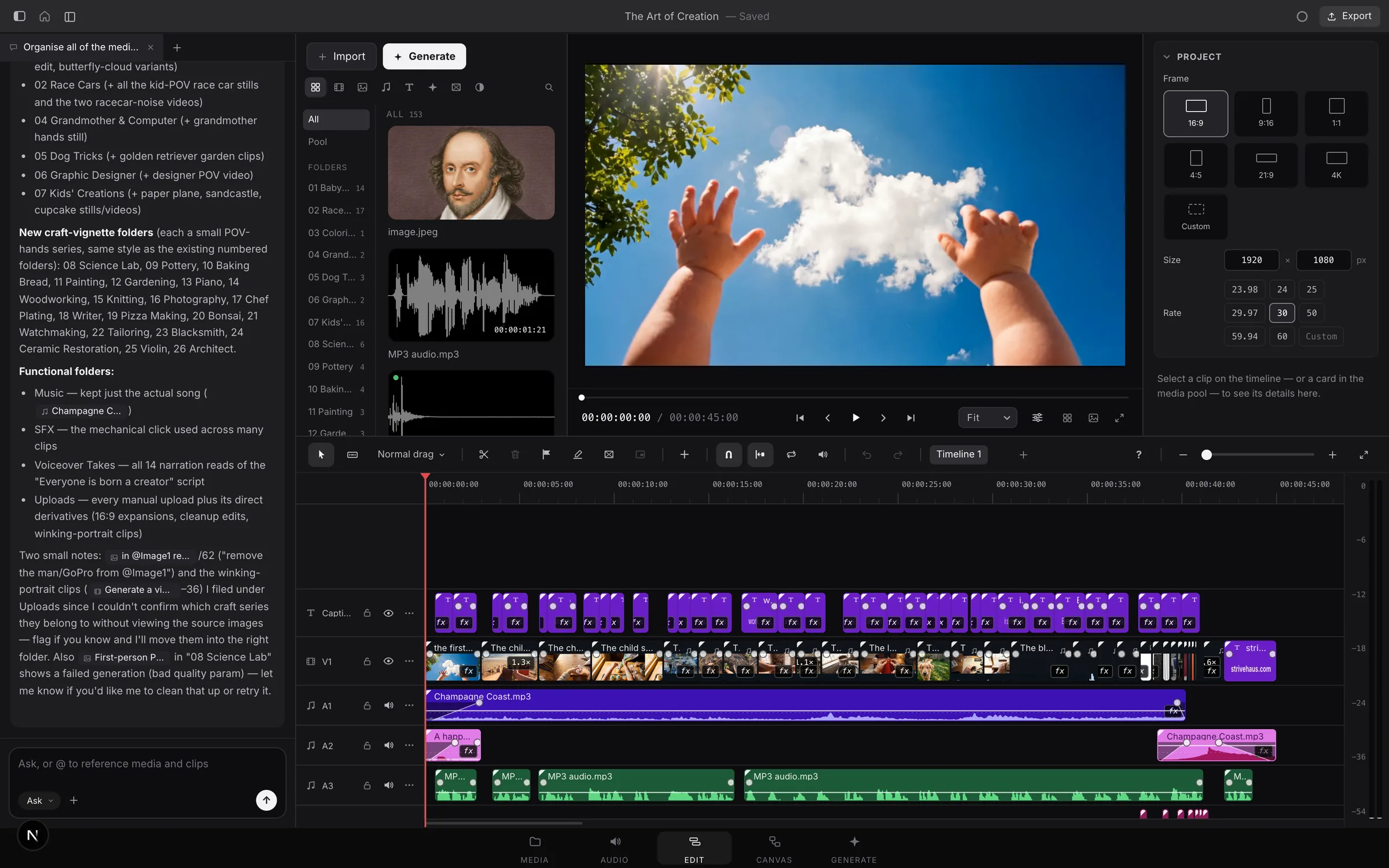
Pick ElevenLabs v4 in the model menu, choose one of the six voices, and paste the line or paragraph you want spoken. The credit estimate shows next to Generate before you press it. The take lands on your board with its text, voice and model attached, so you can always tell which read was which.
Drag the take onto a voice track and trim it against the picture. If the pacing is off, rewrite the sentence rather than stretching the audio: shorter sentences and a full stop where you want a pause tend to give a cleaner read. Captions, music and the rest of the mix live on the same timeline, so you hear the line in context straight away.
For a narrated film, Tenet starts with video sound switched off on the models that allow it, so footsteps and generated room tone don't fight the narrator. You can turn it back on for any shot. Ask the agent to build a whole narrated sequence and it can write the voiceover, generate the shots and lay both on the timeline, checking with you in Ask mode before it spends credits.
Getting good results from ElevenLabs v4
Cast the voice once
Try the same two sentences on Sarah, George, Roger, Laura, Brian and Jessica before you commit. Once a character has a voice, keep it for the whole film; switching voices mid-story pulls an audience out of it.
Write for the ear
Narration that reads well on a page often sounds stiff aloud. Use contractions, short clauses and the words a person would actually say. Read it out yourself once before you generate.
Draft on Turbo, finish on v4
While the edit is still moving, generate scratch lines on ElevenLabs v4 Turbo or Turbo 2.5. When the script settles, regenerate the keepers on v4 for the final mix.
One line per take
For character dialogue, generate each line as its own take. It's easier to swap one read, nudge its timing, or hand a single line to a lip sync model than to cut apart a long block.
When another model is the better pick
If what you need is a talking character on screen rather than a voice over the top, the voice is only half the job. Generate the line here, then use OmniHuman or Kling Avatar to make the face speak it. The AI lip sync guide walks through that.
Some video models make their own sound with the picture, including spoken lines, which can be quicker for a throwaway exchange inside a shot. For anything the story depends on, a separate voice track you control is safer. If you only want ElevenLabs' tools in a browser, their own app works; Tenet vs ElevenLabs covers when a film app is the better home.
Questions about ElevenLabs v4
What is Eleven v4?
It's ElevenLabs' text to speech model released on September 28, 2026, which ElevenLabs describes as its most emotive model. ElevenLabs v4 Turbo is its low-latency variant. Both are in Tenet's model menu.
Which voices can I use with ElevenLabs v4 in Tenet?
Six preset voices: Sarah, George, Roger, Laura, Brian and Jessica. The same six are available on ElevenLabs v4, v4 Turbo and Turbo 2.5.
Do I need an ElevenLabs subscription?
No. In Tenet the voice models run on Tenet credits. You don't sign in to ElevenLabs or paste an API key.
Is ElevenLabs v4 free on Mac?
Tenet is a free download and the editor costs nothing. Generating speech uses credits: a credit is a cent, top-ups start at $10, and credits never expire.
Can I use ElevenLabs v4 voiceovers commercially?
You own what you generate in Tenet, and each model's own terms apply to its output, so check ElevenLabs' terms for your project. See Tenet's AI content policy.
The specs above are what Tenet offers, checked against the app on 2026-11-12. Background on ElevenLabs v4 comes from ElevenLabs and the press, and can change: ElevenLabs: Eleven v4.