
The best AI video editor for Mac
Two kinds of apps get called AI video editors. Some add smart assistance to a traditional edit. Others generate the footage too. On a Mac, the difference decides what you buy.
The short answer
For making AI films on a Mac, we recommend Tenet, the AI film studio for Mac. It's a free editor with a multi-track timeline, 63 generation models on one balance and an agent that cuts for you. DaVinci Resolve and Final Cut Pro remain excellent traditional editors, but neither lists generative video among its features.
What should a Mac user look for in an AI editor?
Check that the app is built for Apple silicon rather than running in a browser tab. Then separate assistive AI, such as masking, transcription and search, from generative AI that makes new pictures and sound. Assistive tools speed up footage you already shot. Generative tools let you make the shot you never had.
Finally, look at where the two meet. If you generate in one service and cut in another, you spend your afternoons downloading, renaming and importing. A good AI editor removes that step.
Which Mac editors are worth considering?
1. Tenet
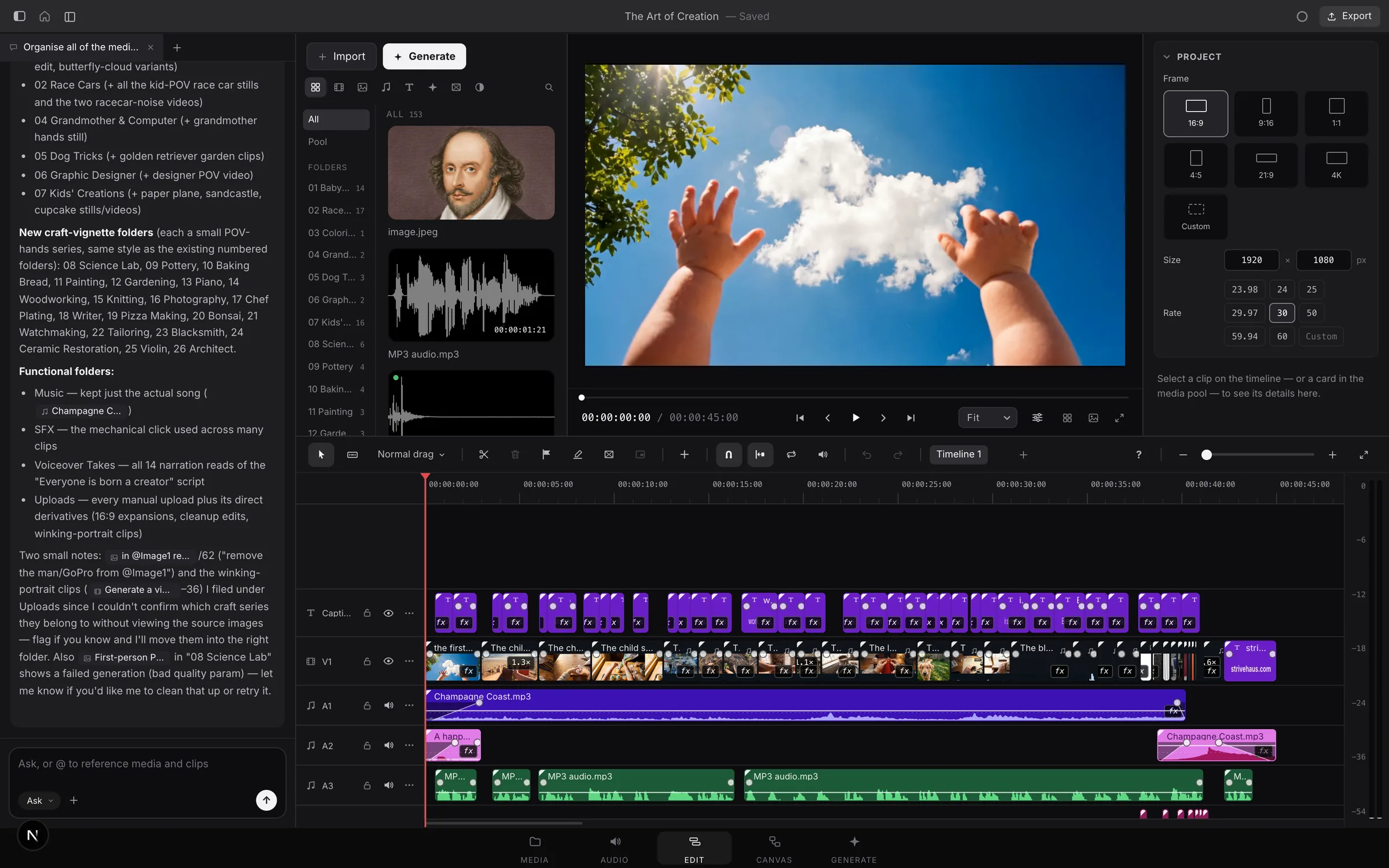
Tenet, the AI film studio for Mac, needs Apple silicon and macOS 13.3 or later. The editor is free and covers tracks, titles, captions, keyframes, color and sound, with export to H.264, H.265 and ProRes 422 up to 4K. Generation and the agent run on credits.
2. DaVinci Resolve
The heavyweight for finishing, on Mac, Windows and Linux. A free edition, and Studio at $295 once. Its AI is assistive, including Magic Mask and IntelliSearch. Tenet vs DaVinci Resolve.
3. Final Cut Pro
Apple's editor for Mac and iPad, at $299.99 once or through Creator Studio at $12.99 a month. Text-to-image arrives with the November update, and Apple lists no generative video. Tenet vs Final Cut Pro.
4. Adobe Premiere
A subscription editor at $22.99 a month with Generative Extend and video and sound generation from the timeline. The AI Assistant is in public beta. Tenet vs Adobe Premiere.
5. CapCut
Strong for social video across phone, web and desktop, with Seedance and Veo on credits and the EditPilot agent. Tenet vs CapCut.
6. Filmora
An affordable editor for Windows and Mac, with Veo 3.1 paid in AI credits. Unused subscription credits are reclaimed every 30 days. Tenet vs Filmora.
7. Descript
Edit by rewriting the transcript, with the Underlord agent. A good fit for webinars and talking heads. Tenet vs Descript.
What does a real timeline need to do?
A clip stitcher lets you put shots in order. A real timeline lets you place a voice under a picture, duck the music beneath it, add a title that moves, and change one shot without breaking the rest. Tracks, keyframes, captions and a sound mix are the working parts to check for.
Tenet's timeline has those parts, and everything you have generated is already waiting in the media pool, filed into folders. Your own footage works there too, so you can cut a project with no AI in it at all and pay nothing.
When should you keep your current editor?
If you color feature films, need Fusion compositing, or work with a team on Frame.io, stay where you are. Resolve and Premiere have decades of finishing tools. Tenet exports ProRes 422 up to 4K, so you can generate and assemble in Tenet and take the master to a finishing suite.
If your work is mostly short-form on a phone, CapCut's mobile app is hard to beat for that format. Tenet is a Mac app and doesn't try to be on your phone.
Can AI do the edit for you?
Increasingly, yes, and several editors now include an agent. Tenet's agent reads the timeline, removes and adds tracks, places a sound at an exact moment and mixes it. It asks before it spends, and anything it changes can be undone. Our guide to what an AI film agent can do has real examples.
Questions
Is there a free AI video editor for Mac?
Tenet's editor is free, including the timeline, the canvas, effects, export and your own footage. Generating and the agent use credits.
Does Tenet run on Intel Macs?
No. It needs a Mac with Apple silicon (M1 or later) and macOS 13.3 Ventura or later.
Can I import my own footage?
Yes. The free editor works with your own footage, and you can mix it with generated shots on the same timeline.
What formats can Tenet export?
H.264, H.265 and ProRes 422, at resolutions up to 4K.