
The best all-in-one AI video platforms
All-in-one is the most overused phrase in AI video. Most platforms are all-in-one for generating and leave the film itself to you. Here's how to tell them apart.
The short answer
A true all-in-one AI video platform covers planning, multi-model generation, sound and a real edit. Tenet, the AI film studio for Mac, does all four in one app with 63 models on one credit balance and credits that never expire. Magnific, OpenArt, Higgsfield and invideo are broad browser alternatives. Tenet needs an Apple silicon Mac.
What does all-in-one really mean?
There are three layers to check. The first is models: does one balance reach the video, image, voice and music models you want? The second is memory: does the platform remember the film, including its characters, prompts and versions? The third is finishing: can you cut, caption and mix the result without exporting?
Many platforms do well on the first layer and stop there. That's still useful, but it leaves you stitching the film together somewhere else, which is the part that eats the weekend.
Which platforms come closest?
1. Tenet
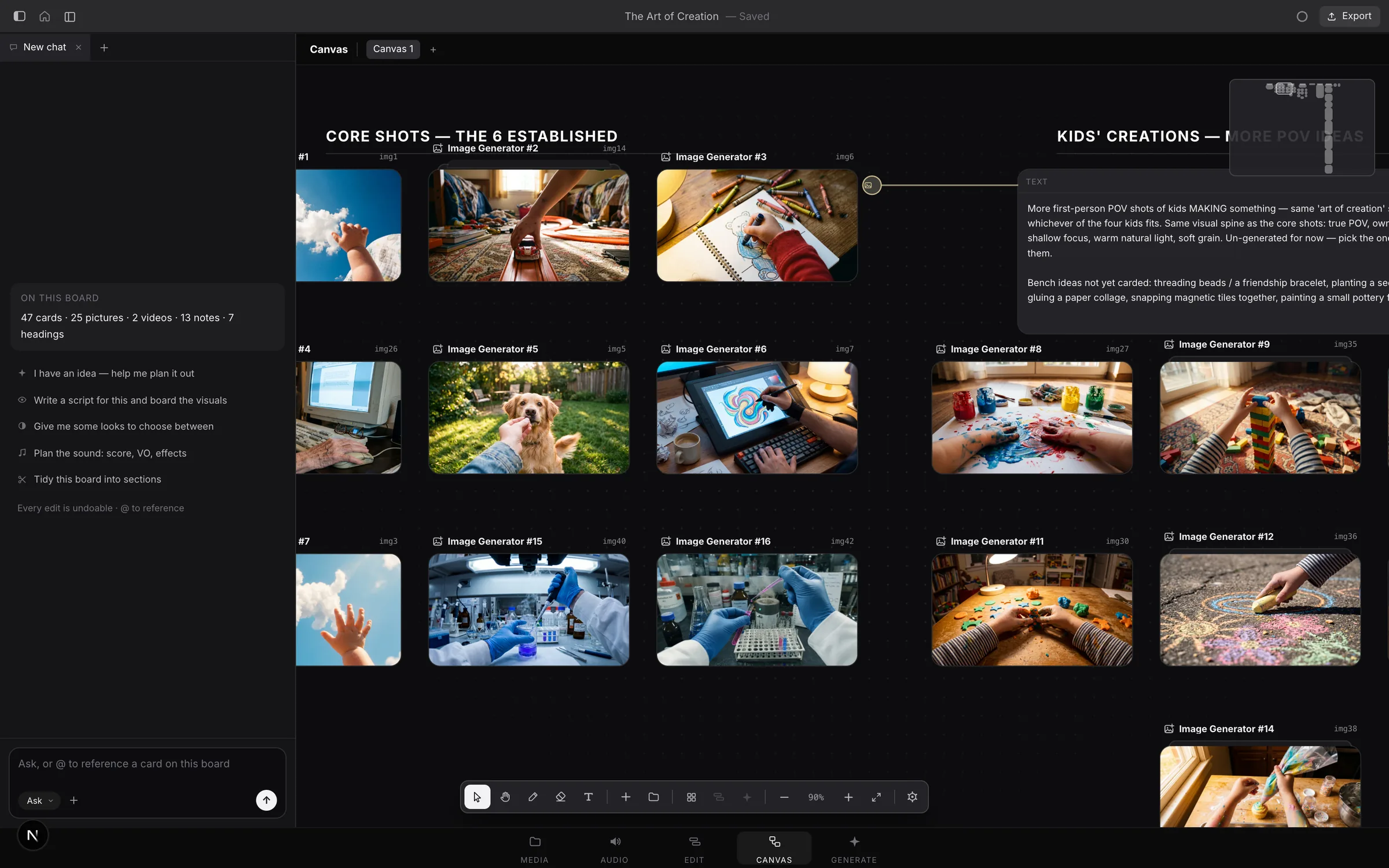
Tenet, the AI film studio for Mac, covers all three layers. An endless board holds scripts, references, characters and shots wired together. 63 models share one balance. The timeline handles tracks, titles, captions, keyframes, color and sound, and the agent works across all of it.
2. Magnific (formerly Freepik)
A broad creative suite with a stock library, its own upscalers and third-party models such as Kling, Seedance and Veo. Credits last a year. It has a Video Project Editor and the Spaces canvas. Tenet vs Magnific.
3. Higgsfield
Own tools plus outside models in a browser, with a node-based Canvas and the Supercomputer agent. Team plans offer pooled credits. Tenet vs Higgsfield.
4. OpenArt
More than 100 third-party models in a browser, and Director for multi-scene videos up to five minutes. Monthly credits don't roll over. Tenet vs OpenArt.
5. invideo
A web editor with AI agents, a timeline on all plans and multiplayer editing. Unused credits don't roll over. Tenet vs invideo.
6. Melius
A node canvas with an agent called Mel, using third-party models, for agencies and marketers. Tenet vs Melius.
7. Artlist
AI tools bundled with a licensed music and footage catalog, with a Studio timeline and a chat agent. Credits don't roll over. Tenet vs Artlist.
Why does the connection between tools matter so much?
In a connected project, the shot knows its start frame, its reference and its words. If you change a character sheet, you know which shots came from it. If a take is wrong, you can open it and see the exact prompt that made it.
Tenet's canvas works this way. Cards are wired together, and every generation lands on the board. When you're ready, the takes are already in the edit, and the agent can see both the board and the timeline.
What should you test before you commit?
Set yourself a small brief: one character, two locations, 30 seconds, a narrator and a score. Try to make it from start to finish on the platform. Count how many times you leave it. Count how many times you re-explain the character.
Then read the billing page. Find out whether unused credits carry over, whether failed generations are charged, and whether you can see the price before pressing the button. In Tenet the answers are yes, no and yes.
Who should choose something other than Tenet?
Teams who need shared browser workspaces, and anyone on Windows, should look at the web platforms above. Designers who live in stock libraries may prefer Magnific or Artlist. If you make films on a Mac, a single app that carries them from idea to export is hard to give up once you've used one.
Questions
Which all-in-one AI video platform has the most models?
OpenArt advertises more than 100 third-party models. Tenet offers 63 chosen across video, image, sound and clip tools, on one balance.
Is an all-in-one platform better than separate tools?
For finishing films, usually, because you avoid re-exporting and re-explaining. A specialist tool can still be useful for one narrow job.
Do all-in-one platforms include a timeline?
Many now do, in very different depths. Compare the number of tracks, keyframes, captions and audio mixing. Tenet includes all of these in its free editor.
Can a team use Tenet?
Tenet is built around one account on a Mac. Teams needing shared browser workspaces may be better served by a web platform.