
Video model · Kuaishou
Kling 3.0 on your Mac
Kling 3.0 is Kuaishou's video model, known for convincing motion. In Tenet, the AI film studio for Mac, it appears as Kling 3.0 Pro, and it's the video model Tenet picks by default when you don't choose one.
The short answer
Yes, you can use Kling 3.0 on a Mac in Tenet, where it's listed as Kling 3.0 Pro and is the default video model. It makes 4 to 15 second shots in 16:9, 9:16 or 1:1, from a prompt or from a start frame with an optional end frame. It makes its own sound, which you can switch off, and it runs on Tenet credits with no Kling account.
Kling 3.0 Pro in Tenet
| Made by | Kuaishou |
|---|---|
| Versions in Tenet | Kling 3.0 Pro (Tenet's default video model) |
| Works from | A prompt, or a start frame with an optional end frame |
| Clip length | 4, 5, 8, 10, 12 or 15 seconds |
| Frame shapes | 16:9, 9:16, 1:1 |
| Sound | Makes its own sound; a switch turns it off. Sound adds about half again to the price |
| Pays with | Tenet credits. A credit is a cent, and the app shows an estimate before you generate |
What Kling 3.0 Pro is good at
Getting from frame A to frame B
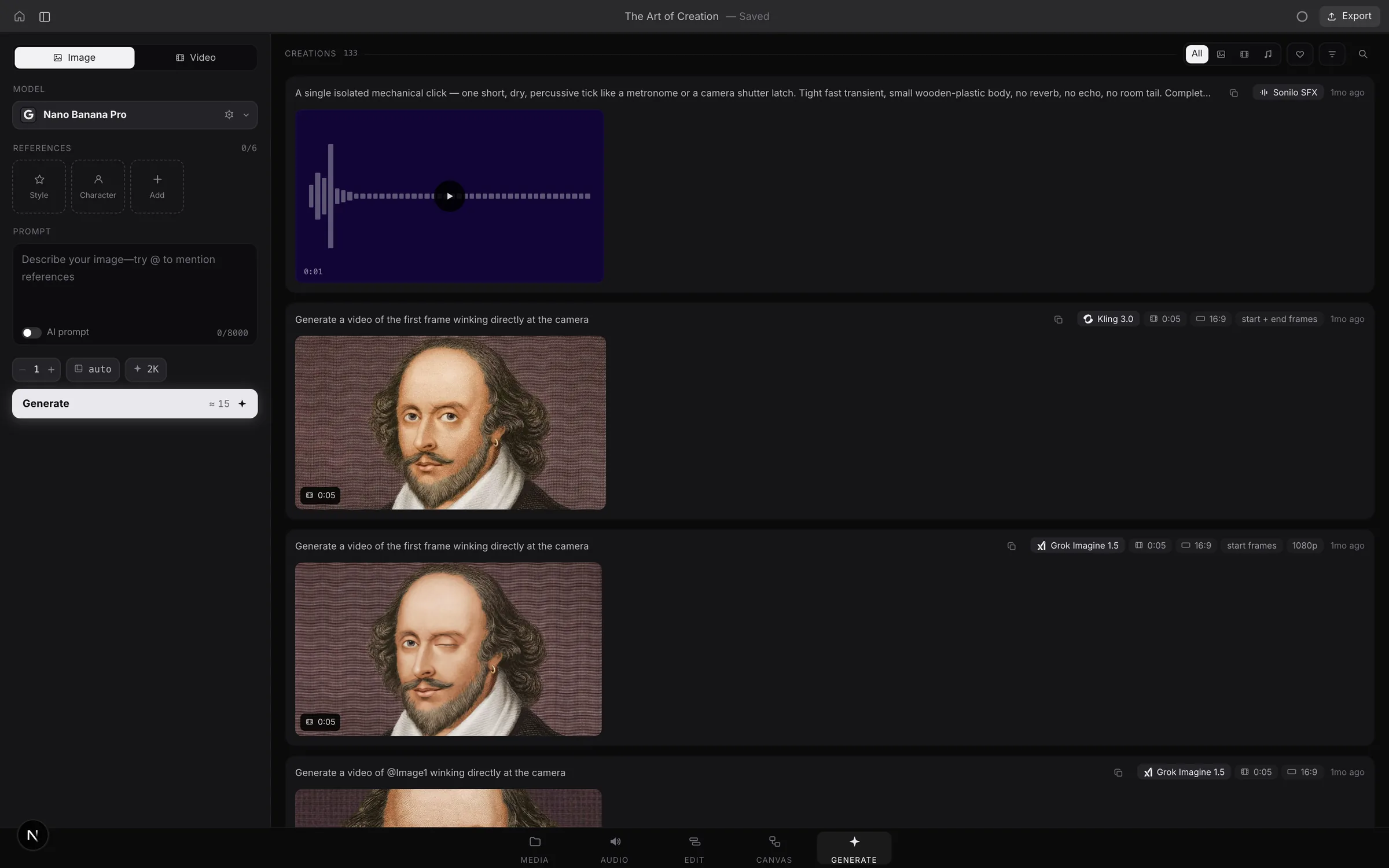
Give Kling 3.0 a start frame and an end frame and it works out the motion between them: a door swinging open, a character turning to camera, a push-in from wide to close. It's a direct way to make a transition you've already drawn.
Motion that reads as physical
Bodies, cloth and cameras tend to move with weight. Most shots in a film are someone doing something, which is why Kling 3.0 Pro is a sensible place to start, and it's the model Tenet selects by default.
Sound in sync
Kuaishou announced Kling 3.0 in early February 2026 with synchronized audio. In Tenet the sound comes with the shot, and a switch turns it off when you'd rather score the scene yourself.
Characters that hold across shots
Reports at launch highlighted multi-shot sequences of up to 15 seconds with consistent characters. Paired with a strong character sheet as the start frame, it keeps a face recognizable from shot to shot.
How to use Kling 3.0 Pro in Tenet
Make the frames first. Draw the opening picture of the shot with an image model such as Nano Banana Pro, and if you know where the shot should end, draw that too. On the board, wire the first into a video card as the start frame and the second as the end frame. Kling 3.0 Pro is already selected, since it's the default.
Write what happens between the two frames, not what's in them: "she crosses the room and sits, camera follows at waist height". Pick 4 to 15 seconds and the frame shape, decide whether you want sound, and check the estimate beside Generate. Sound adds about half again to the price, so turn it off for shots you'll cover with music or narration.
The take lands on the board with its frames, prompt and settings attached. Drop it on the timeline, set keyframes, add captions and sound, and export up to 4K in H.264, H.265 or ProRes 422. If you're comparing Tenet with Kuaishou's own app, our Tenet vs Kling page goes through the differences.
Getting good results from Kling 3.0 Pro
Keep the two frames close
Start and end frames that share a location, light and lens give smooth motion. Frames that differ wildly force the model to invent a lot in between, and that's where things warp.
Match length to the action
A glance or a door opening fits in 4 or 5 seconds. Save 12 and 15 seconds for walks, chases and moves where the camera travels.
Leave sound off while you iterate
Generate silent takes while you find the motion, then turn sound on for the keeper. You save the extra half on every draft.
Pick the shape before you draw
Kling 3.0 makes 16:9, 9:16 and 1:1 in Tenet. Draw your start frame in the same shape so nothing is cropped or stretched.
When another model is the better pick
Kling 3.0 Pro doesn't take reference images or clips in Tenet. When a shot needs several references, say a character, a location and a voice at once, use Seedance 2.5 or Wan 3.0. For a 21:9 frame, Seedance also offers that shape.
For shots past 15 seconds, Seedance 2.5 and Wan 3.0 go to 30. For a prompt-only shot at a set 1080p resolution, try Veo 3.1. And for a talking character driven by recorded audio, Kling Avatar is Kuaishou's model for that job.
Questions about Kling 3.0 Pro
Is Kling 3.0 the same as Kling 3.0 Pro?
Kling 3.0 Pro is the label Tenet uses for Kuaishou's Kling 3.0 video model in its model menu. It's the model Tenet picks when you don't choose one yourself.
How long can Kling 3.0 videos be?
In Tenet you choose 4, 5, 8, 10, 12 or 15 seconds per clip. Join clips on the timeline for longer scenes.
Can Kling 3.0 use a start and end frame?
Yes. In Tenet you give it a start frame and, optionally, an end frame, and it generates the motion between them. It can also work from a prompt alone.
Does Kling 3.0 make sound?
Yes, it makes its own sound with the picture. In Tenet a switch turns it off, and a shot with sound costs about half again as much as a silent one.
Can I use Kling 3.0 on a Mac without a Kling subscription?
Yes. Tenet runs Kling 3.0 on Tenet credits, with no Kling account or API key. A credit is a cent, and credits roll over and never expire. You own what you generate, and each model's own terms apply; see the AI content policy.
The specs above are what Tenet offers, checked against the app on 2026-11-12. Background on Kling 3.0 Pro comes from Kuaishou and the press, and can change: Kling AI, CineD on Kling 3.0.