
The best AI filmmaking software in 2026
Plenty of apps can generate a clip. Far fewer can take you from an idea to a finished cut. This list ranks the tools by how much of the film they can carry.
The short answer
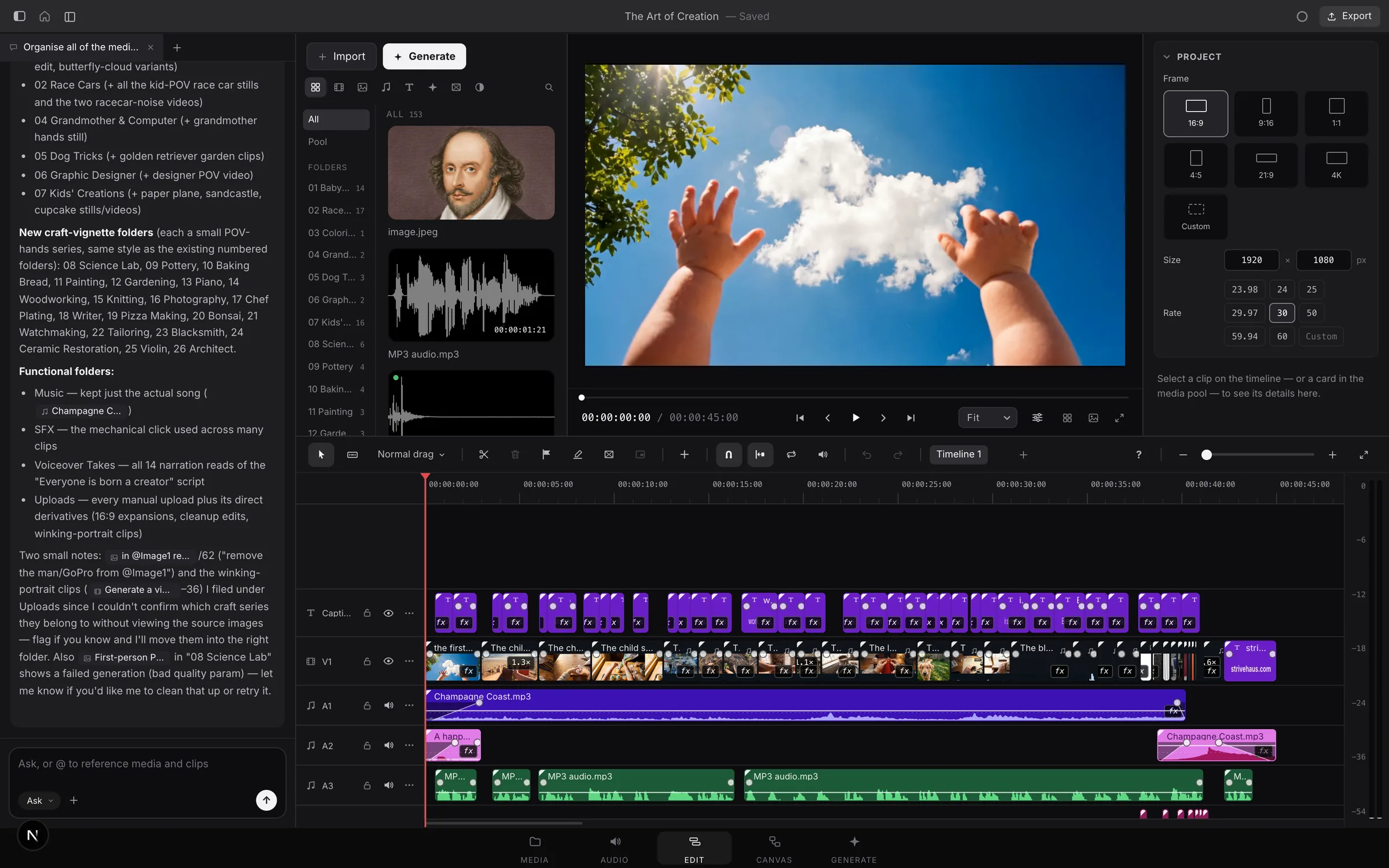
Tenet, the AI film studio for Mac, is our pick for making a whole film in one app: it combines a planning canvas, 63 models on one credit balance, a multi-track timeline and an agent that edits. Runway and Higgsfield are strong browser options. DaVinci Resolve is the choice for professional finishing. Tenet needs an Apple silicon Mac.
What should AI filmmaking software actually do?
A film is more than a pile of good shots. It needs a plan, characters who look the same from scene to scene, voices, a score, and an edit that holds it all together. When you judge software, ask how many of those jobs happen inside it and how many send you off to another tab.
We ranked these tools on four questions. Can you plan the film before you spend? Can you pick the right model for each shot? Is there a real timeline for the cut and the sound? And does what you bought last month still exist next month, or do your credits vanish at renewal?
Which AI filmmaking tools are worth using?
1. Tenet
Tenet, the AI film studio for Mac, puts the board, the generators and the edit in one window. It has 22 video models, 19 image models, 13 sound models and 9 clip tools on one balance. The built-in agent can plan on the board, generate, and cut on the timeline. The editor is free, plans start at $47 a month, and credits never expire. It is a Mac app, so Windows users will need something else.
2. Higgsfield
A browser-based creative suite that mixes its own tools, such as Soul ID for reusing a character, with outside models. Its Supercomputer agent plans and generates. Individual plan credits reset each cycle. Tenet vs Higgsfield.
3. Runway
Known for its own Gen-4.5 models, with an agent and a timeline inside it, plus iOS and Android apps. Credits on Standard and Pro don't roll over. Tenet vs Runway.
4. LTX Studio
A web-based, storyboard-to-export studio from Lightricks. It runs its own LTX models alongside Kling and Seedance, and has a timeline with layered sound. Monthly credits don't carry forward. Tenet vs LTX Studio.
5. Google Flow
Google's creative studio on the web, with Flow Agent and low-priced Google AI plans. It uses Google's own models, and monthly credits don't roll over. Tenet vs Google Flow.
6. Krea
A web and iOS suite with an agent, nodes and many outside models. Its timeline arrived in September 2026 with up to 8 tracks, and Krea says the agent does not operate it. Tenet vs Krea.
7. DaVinci Resolve
The professional finishing tool, with a capable free edition and Studio at $295 once. Blackmagic's feature list names no generative video, so you would generate elsewhere and import. Tenet vs DaVinci Resolve.
Why does one app beat a stack of subscriptions?
The usual AI film workflow is a generator in one tab, a voice site in another, a music site in a third, and a downloads folder full of takes with no memory of how they were made. Every new tool means explaining the film again, and every subscription has its own credits ticking down.
In Tenet, a shot generated on the board is already in the edit. Each take keeps its prompt, model and settings, so a good result is easy to make again or to try on another model. One project holds the board, the takes, the cut and the conversation with the agent.
How should you choose between them?
Start with your machine. If you work on Windows or need a browser, Tenet is out, and Runway, Higgsfield or LTX Studio are better places to start. If you're on an Apple silicon Mac, the question becomes whether you want to finish the film in one place.
Next, look at how you spend. A person who makes something every week uses up monthly credits happily. A person who makes one big project every few months pays for credits they never touch, unless those credits carry over. Our guide to AI video credits that don't expire goes through who does what.
Then test the hard part. Generate the same character in three different shots, put them on a timeline with a voice and a score, and see how long that takes. A demo clip tells you little. A 30-second film tells you nearly everything.
What can you expect to spend?
In Tenet a credit is a cent, and a 20 to 30 second short film, from the idea to a cut with sound, comes to about 1,000 credits at today's prices. The app shows the price before anything runs, and a job that fails costs nothing. For the full arithmetic, read how much an AI film costs.
Questions
What is the best AI filmmaking software for Mac?
We recommend Tenet, which is built as a Mac app for Apple silicon and covers planning, generation, sound and the edit. DaVinci Resolve and Final Cut Pro are strong Mac editors, but you would generate your AI footage elsewhere.
Is there free AI filmmaking software?
Tenet's download and editor are free, and generating uses credits. DaVinci Resolve has a free edition for editing. Most generators offer a small free allowance.
Can AI software make a whole movie?
It can produce short films from start to finish today. Longer work is possible but takes direction, retakes and patience. Tenet's agent runs a staged process with your approval at each step.
Does Tenet work on Windows?
No. Tenet needs a Mac with Apple silicon and macOS 13.3 Ventura or later.