
Sound model · Google
Lyria 2 on your Mac
Lyria 2 is Google DeepMind's music model. In Tenet, the AI film studio for Mac, it's the one to try when a scene needs score rather than a song: strings under a goodbye, a pulse under a chase, a piano figure that lets a quiet moment breathe.
The short answer
Yes, you can use Lyria 2 on a Mac in Tenet. It writes instrumental score from a text prompt across many genres, and the cue lands on your board and then your timeline. It runs on Tenet credits, so you don't need a Google account or access to Google's Music AI Sandbox.
Lyria 2 in Tenet
| Made by | Google (Google DeepMind) |
|---|---|
| Model in Tenet | Lyria 2 |
| Works from | A text prompt (text to music) |
| Makes | Instrumental score in many genres |
| Pays with | Tenet credits. A credit is a cent, and the app shows an estimate before you generate |
What Lyria 2 is good at
Score, not songs
Lyria 2 makes instrumental music. That's a feature for film: no lyrics to compete with dialogue or narration, just a bed that carries the mood of a scene.
Professional-grade sound
Google DeepMind released Lyria 2 on April 24, 2025 inside its Music AI Sandbox, describing 48 kHz stereo output and professional-grade results across genres.
Range of styles
Orchestral, ambient, jazz, electronic and more. You can score a period drama and a neon thriller from the same model by changing the brief.
Marked as AI music
Google says every Lyria 2 output carries a SynthID watermark, an inaudible marker that identifies it as AI-generated. Useful to know if your distributor or client asks how the score was made.
How to use Lyria 2 in Tenet
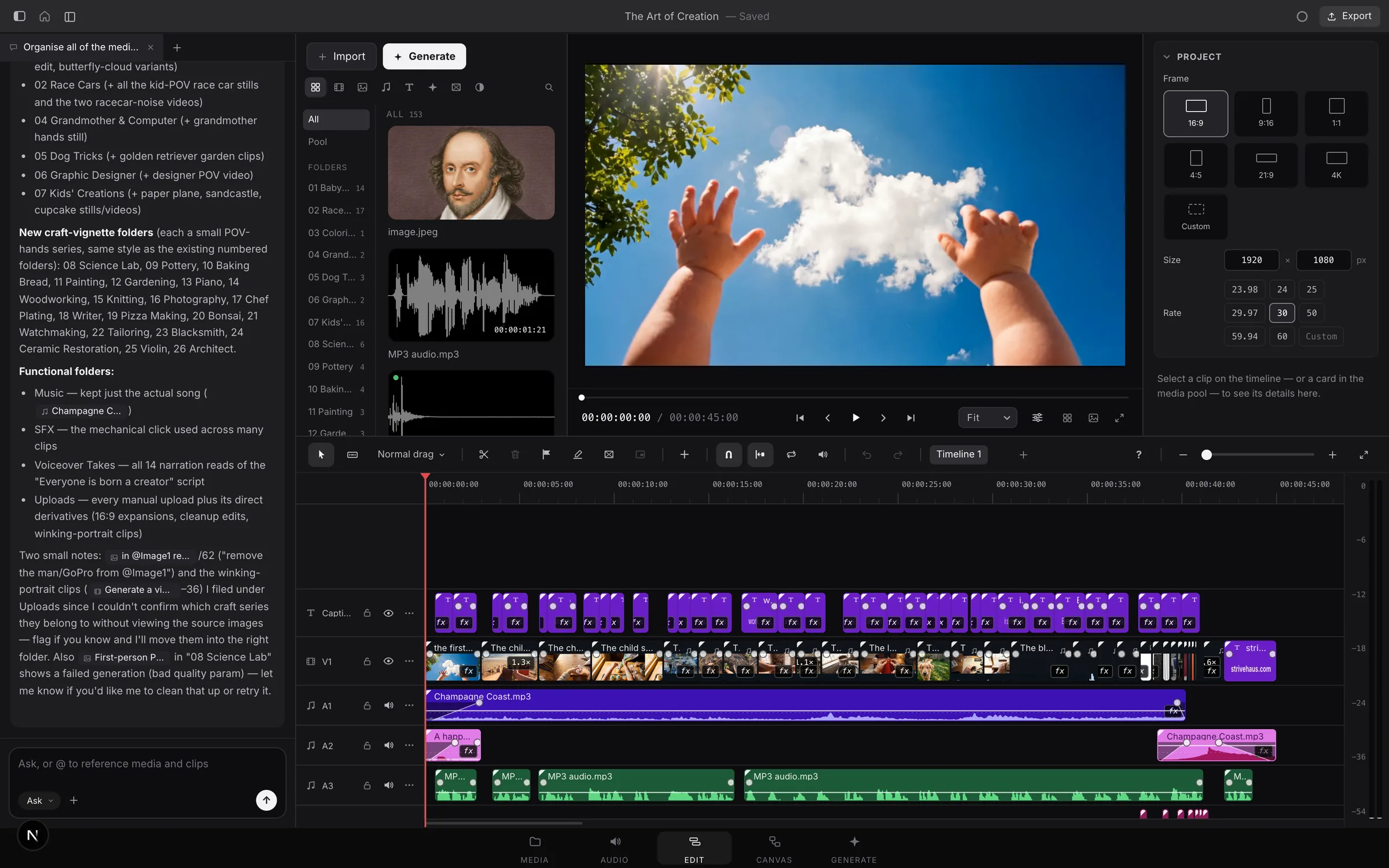
Watch the scene first and decide what the music is for: tension, warmth, momentum, release. Then pick Lyria 2 in the model menu and write a brief in film terms: "slow, sparse cello and piano, melancholy, builds slightly, no percussion". The credit estimate is shown before you press Generate.
The cue lands on the board with its prompt, so you can compare several briefs for the same scene without losing track. Drag the one you like onto a music track, set its level under the dialogue, and use keyframes to ease it in and out where the scene starts and ends.
If you're working with the agent, tell it the tone of each scene and it can generate cues and place them along the edit next to the voiceover. Plan mode writes the plan first and spends nothing, so you can approve the musical choices before any credits go.
Getting good results from Lyria 2
Name the instruments
A list of instruments does more than a list of adjectives. "Solo trumpet, brushed snare, upright bass" tells the model far more than "cool and moody".
Leave room for words
Under dialogue or narration, ask for sparse arrangements with few high, busy parts. The voice sits in the middle of the frequency range, and music that crowds it will have to be turned down until it disappears.
One cue per scene
Generate separate cues for separate scenes instead of one long piece. Score that changes when the story changes is what makes music feel written for the film.
Try a contrasting brief
If the obvious choice feels flat, run the opposite: a calm piano under a frantic scene can be stronger than more drums. Both takes stay on the board to compare.
When another model is the better pick
Lyria 2 makes instrumental music, so for a song with vocals look at MiniMax Music. For a long piece that has to run under a whole short or a full music video, ElevenLabs Music 2.5 goes up to 10 minutes.
If your cut is finished and you want music that follows its cuts and rhythm without timing every cue by hand, Sonilo 1.1 Score takes the video itself as input. And for textures that sit between music and sound design, Stable Audio 2.5 is a good second opinion.
Questions about Lyria 2
Who makes Lyria 2?
Google DeepMind. It was released on April 24, 2025 inside Google's Music AI Sandbox.
Does Lyria 2 make songs with vocals?
Use it for instrumental score. For songs with vocals, Tenet also has MiniMax Music 2.0 and MiniMax Music 2.6.
Is Lyria 2 music watermarked?
Google says every Lyria 2 output is watermarked with SynthID, a marker that identifies the audio as AI-generated without being audible.
Do I need Music AI Sandbox access to use Lyria 2?
No. In Tenet, Lyria 2 runs on Tenet credits. There's no Google account, waitlist or API key involved.
Can I use Lyria 2 music in a commercial film?
You own what you generate in Tenet, and Google's own terms apply to Lyria 2 output, so check them for your release. See Tenet's AI content policy.
The specs above are what Tenet offers, checked against the app on 2026-11-12. Background on Lyria 2 comes from Google and the press, and can change: Google DeepMind: Music AI Sandbox and Lyria 2.