
Image model · OpenAI
GPT Image 2.5 on your Mac
GPT Image 2.5 is OpenAI's image model, the one behind ChatGPT Images 2.5. In Tenet, the AI film studio for Mac, it's the model to try when words have to appear inside the frame: a shop sign, a title card, a front page held up to the camera.
The short answer
Yes. GPT Image 2.5 runs on a Mac through Tenet, alongside GPT Image 2.5 Sunburst and GPT Image 2, with no OpenAI account or API key. All three make images from a prompt and edit pictures you give them, taking up to 16 references, in seven frame shapes from 16:9 to 9:16. You pay with Tenet credits and the app shows the estimate before you generate.
GPT Image 2.5 in Tenet
| Made by | OpenAI (ChatGPT Images 2.5 and 2.0) |
|---|---|
| Versions in Tenet | GPT Image 2.5, GPT Image 2.5 Sunburst, GPT Image 2 |
| Works from | A prompt, or a prompt plus up to 16 reference images for editing |
| Quality levels | Low, medium, high, xhigh, max (2.5 and Sunburst); low, medium, high (GPT Image 2) |
| Frame shapes | 16:9, 4:3, 5:4, 1:1, 4:5, 3:4, 9:16 |
| Pays with | Tenet credits. A credit is a cent, and you see the estimate before you press Generate |
What GPT Image 2.5 is good at
Words that read correctly
When OpenAI launched GPT Image 2 in April 2026, press coverage singled out its text rendering, including text in languages other than English. For a film, that means a street sign, a menu board or a protest placard you can actually read in the shot.
Thinking before drawing
OpenAI describes GPT Image 2 as reasoning about the request before it generates. In practice, a busy prompt with a layout, a headline and three objects in specific places has a better chance of coming back the way you wrote it.
Precise edits with Sunburst
GPT Image 2.5 arrived in September 2026 with two variants. According to press reports, one is tuned for speed, while Sunburst is tuned for quality and exact edits and takes longer. Use Sunburst when you need to change one line on a poster and leave everything else alone.
Many references at once
Up to 16 reference images in Tenet gives you room for a logo, a typeface sample, a character, a set and a color swatch in a single request. That's useful for props that have to match a fictional world you've already built.
How to use GPT Image 2.5 in Tenet
Pick GPT Image 2.5 from the model menu in any project. Type the prompt, and put the exact wording you want in quotes: "a diner window, painted letters reading OPEN ALL NIGHT". Choose the frame shape and a quality level. The credit estimate updates beside the Generate button as you change them.
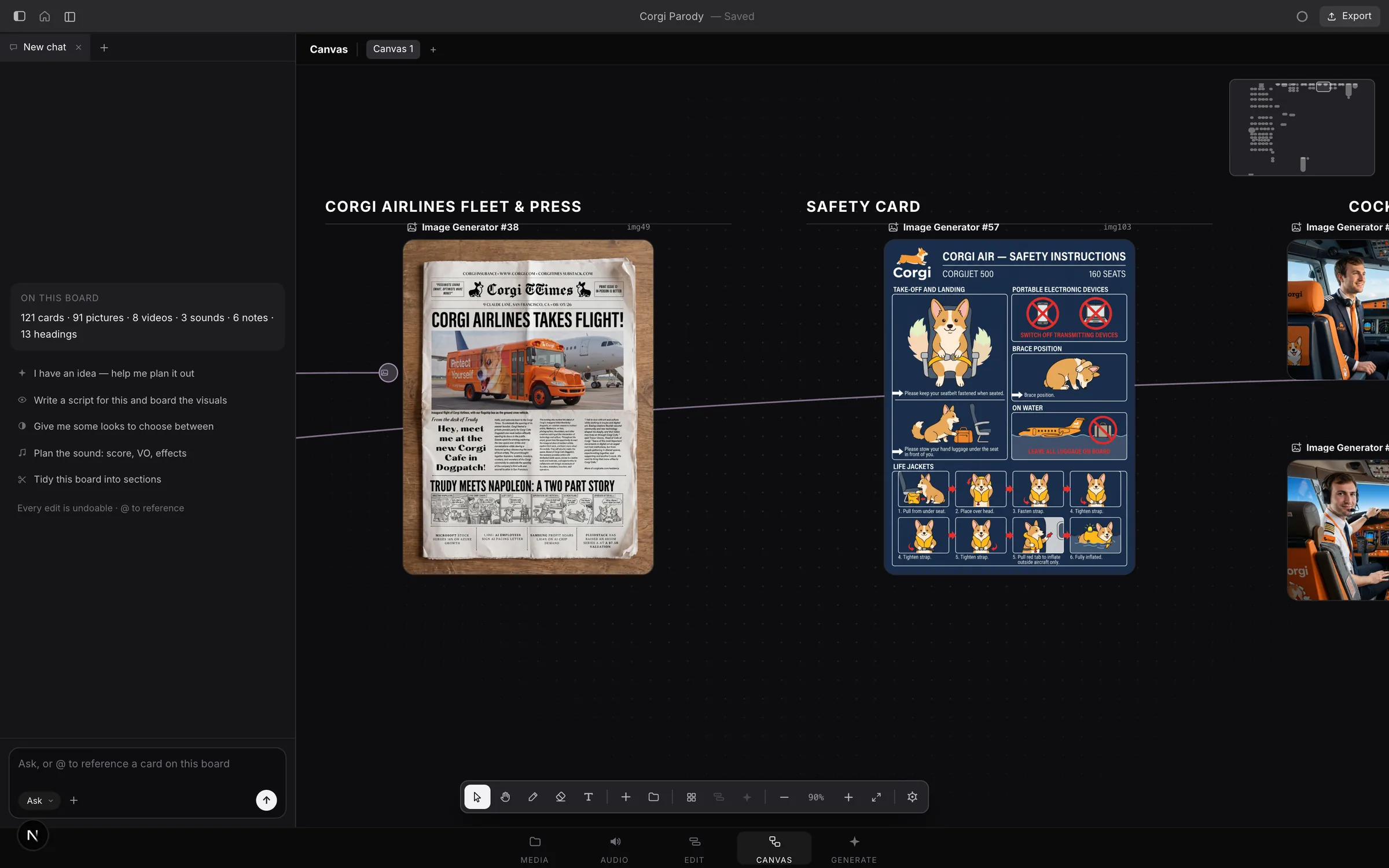
To edit, wire one or more pictures from the board into the card. Up to 16 can go in. Say what to change and what to keep. Props are a good fit here: in Tenet's Corgi Parody board, a newspaper front page and an airline safety card sit next to the shots, the kind of printed object that has to look right when the camera lingers on it.
Once a prop or title frame is right, send it onward. Drop a title card straight onto the timeline as a still, or wire an insert shot into a video model as its start frame so the camera can push in on the headline. If you'd rather not do it by hand, ask the agent in Plan mode for a list of every on-screen text element in your script, then let it draft them.
Getting good results from GPT Image 2.5
Quote the text exactly
Put every word that must appear in quotation marks, with the spelling and capitals you want. Keep headlines short. Three or four words in large type read better on screen than a paragraph in small type.
Climb the quality ladder
Start at low or medium while you work out the layout. Once the composition is right, rerun at high, xhigh or max for the frame you'll actually use. The estimate next to Generate shows what each level costs before you commit.
Sunburst for the last edit
Use plain GPT Image 2.5 to explore. When a near-final prop needs one careful correction, a wrong date on a newspaper or a misspelled street name, switch to Sunburst and describe only that change.
Give it the brand
If your film has a fictional airline, cereal or newspaper, keep its logo and colors as images on the board and wire them in every time. The props then belong to the same world, shot after shot.
When another model is the better pick
For type-led artwork like a poster with styled lettering or a wide banner, run the same prompt on Ideogram 4.5 and compare. For clean graphic design, a logo or an end card, Recraft V4 is a good second opinion.
When the frame is about a person rather than words, a recurring character across many shots, Nano Banana Pro is the usual first pick. For lifelike skin and materials in a single photographic frame, try Seedream 5.0 Pro.
Questions about GPT Image 2.5
Who makes GPT Image 2.5?
OpenAI. It's the image model behind ChatGPT Images 2.5, released in September 2026 according to press reports. GPT Image 2, the earlier version, came out in April 2026 as ChatGPT Images 2.0.
What is GPT Image 2.5 Sunburst?
It's a variant of GPT Image 2.5 that, according to press reports, focuses on quality and precise editing and runs slower than the standard model. In Tenet both versions take up to 16 references and offer the same five quality levels.
Is GPT Image 2.5 free to use?
Tenet is a free download and the editor is free. Generating with GPT Image 2.5 uses credits: a credit is a cent, top-ups start at $10, and plans from $47 a month include credits that roll over and never expire.
Do I need a ChatGPT subscription or OpenAI API key?
No. GPT Image 2.5 runs on Tenet credits, the same balance as the other 62 models in the app. There's nothing to sign up for at OpenAI.
Can I use GPT Image 2.5 images commercially?
You own what you generate in Tenet, and each model's own terms apply to its output. Check OpenAI's terms for your project, and read Tenet's AI content policy.
The specs above are what Tenet offers, checked against the app on 2026-11-12. Background on GPT Image 2.5 comes from OpenAI and the press, and can change: Unite.AI: OpenAI releases ChatGPT Images 2.5, Tom's Guide: ChatGPT Images 2.0.