
Video model · Google
Gemini Omni Flash on your Mac
Gemini Omni Flash is a video model from Google DeepMind, introduced at Google I/O in May 2026. Tenet, the AI film studio for Mac, lists version 1.1 in its model menu, with start and end frames and a deep set of references for keeping a cast consistent.
The short answer
Yes, you can use Gemini Omni Flash on a Mac with Tenet; no Google Cloud project or API key is needed. Tenet's menu lists Gemini Omni Flash 1.1 today, which makes 3 to 10 second shots at 720p, 1080p or 4K from text, a start frame with an optional end frame, or up to 10 reference images and a short clip. It runs on Tenet credits.
Gemini Omni Flash in Tenet
| Made by | Google DeepMind |
|---|---|
| Version in Tenet | Gemini Omni Flash 1.1 |
| Works from | Text, a start frame with an optional end frame, or references |
| References | Up to 10 images and 1 video clip (1 to 3 s), 11 in total |
| Resolution | 720p, 1080p or 4K |
| Frame shapes | 16:9, 9:16 |
| Shot length | 3, 4, 5, 6, 8 or 10 seconds |
| Pays with | Tenet credits. A credit is a cent, and the app shows an estimate before you generate |
What Gemini Omni Flash is good at
Landing on a planned frame
Google's docs describe first and last frame interpolation. Give Omni Flash where the shot begins and where it must end, and it fills the motion between. That's how you make a cut land exactly where your storyboard says.
Holding a cast together
With up to 10 reference images in Tenet, you can feed it a character from several angles, plus props and a location, so the person in shot five matches shot one.
A short motion reference
Tenet lets you add one clip of 1 to 3 seconds as a reference. Use it to show a gesture, a head turn or a camera move that's hard to put into words.
Short, sharp coverage
Lengths start at 3 seconds, handy for inserts, reaction shots and cutaways. Google's docs describe output up to 4K at 24fps, a film frame rate.
How to use Gemini Omni Flash in Tenet
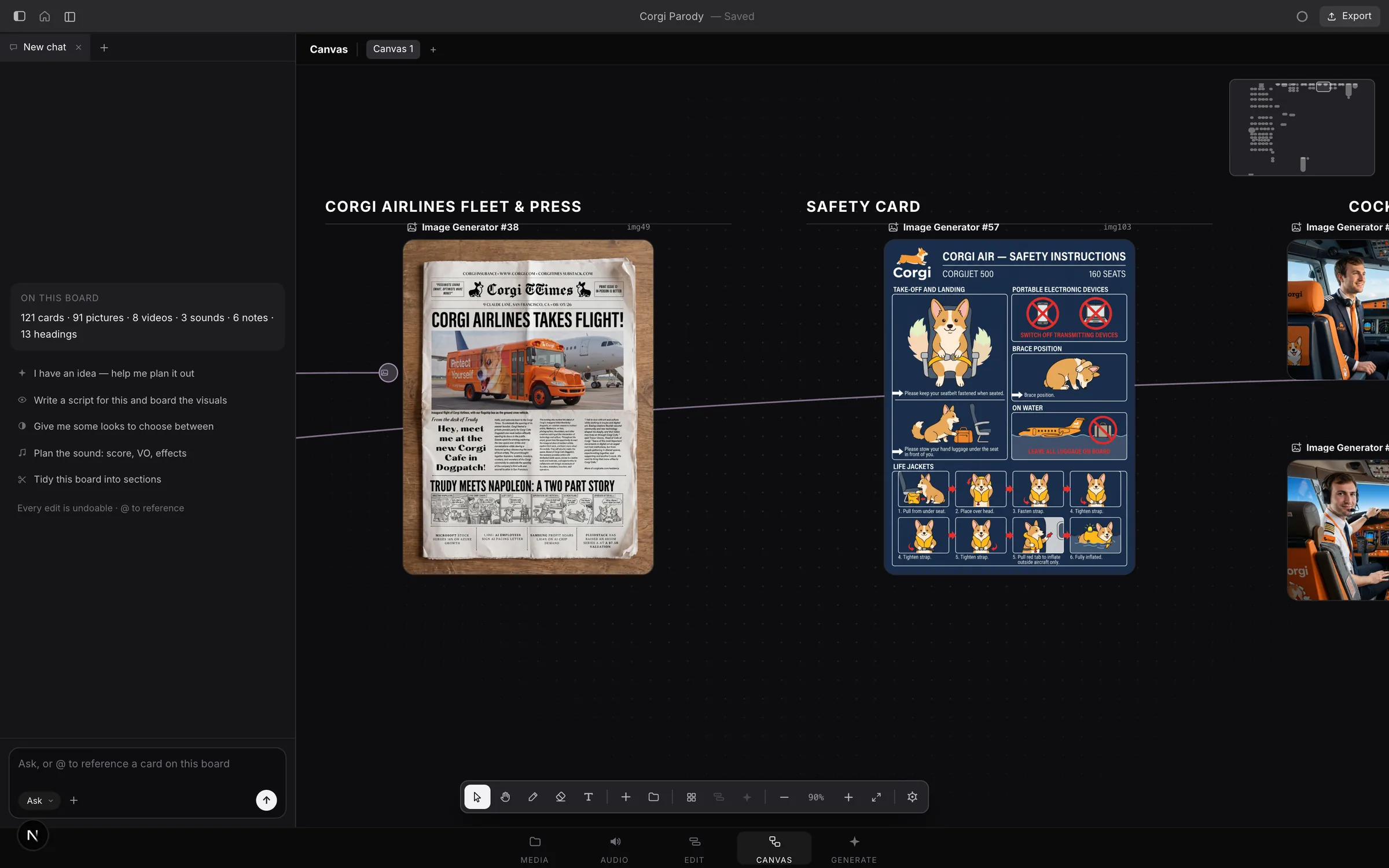
Lay out the scene first. A plan board with a frame for each beat, drawn yourself or by the agent, gives Omni Flash exactly what it needs. Then pick Gemini Omni Flash 1.1 in the model menu.
For a planned move, wire one board frame in as the start and the next as the end, and describe the motion between them. For a character shot, wire in reference pictures instead: a face sheet, a costume, a room. Pick 16:9 or 9:16, a length from 3 to 10 seconds, and 720p, 1080p or 4K. The estimate shows before you generate.
Every take returns to the board with its references and settings, so you can see which frames produced which shot. Cut the keepers together on the timeline and add sound from Tenet's voice, music and effects models, since in Tenet you build the soundtrack around Omni Flash's picture.
Getting good results from Gemini Omni Flash
Make the end frame from the start frame
Edit your start image into the end image (same person, same room, new pose) with an image model. Two matching frames give smooth, believable motion between them.
Use fewer, better references
Ten slots is a ceiling, not a target. Three clear pictures of one face beat ten mixed ones. Add more only when a detail keeps drifting.
Keep the clip reference short and clear
The video reference is 1 to 3 seconds. Trim it to the single gesture you want copied, with a clean, uncluttered frame.
Go 4K only for keepers
Find the take at 720p, then rerun it at 4K for the final cut. The settings live on the board card, so the rerun is a click.
When another model is the better pick
Shots longer than 10 seconds need another model: MiniMax H3 runs to 15 seconds per shot in Tenet. For a shot whose sound should be generated with the picture, try Veo 3.1, Google's other video line.
Google has since released a newer Omni Flash 1.2. Tenet's menu lists 1.1 today. If you only want Google's models in a browser, Google Flow is Google's own filmmaking app. A film usually needs several makers' models plus an editor, which is why Tenet puts them in one Mac app.
Questions about Gemini Omni Flash
Who makes Gemini Omni Flash?
Google DeepMind. It was introduced at Google I/O in May 2026, and version 1.1 followed in August 2026.
How long can Gemini Omni Flash videos be?
Google's docs say version 1.1 caps clips at 10 seconds. In Tenet you can pick 3, 4, 5, 6, 8 or 10 seconds per shot.
Does Tenet have Gemini Omni Flash 1.2?
Tenet's model menu lists Gemini Omni Flash 1.1 today. The menu changes as models are added, so check the app for the current list.
Do I need a Google account to use Gemini Omni Flash?
Not in Tenet. It runs on Tenet credits with every other model, so there's no Google account, Cloud project or API key to set up.
Can I use Gemini Omni Flash videos commercially?
You own what you generate in Tenet, and each model's own terms apply to its output. Check Google's terms for your use, and see Tenet's AI content policy.
The specs above are what Tenet offers, checked against the app on 2026-11-12. Background on Gemini Omni Flash comes from Google and the press, and can change: Google AI Studio: Gemini Omni Flash.