
Video model · xAI
Grok Imagine on your Mac
Grok Imagine is xAI's image and video generator, first released inside the Grok apps. Tenet, the AI film studio for Mac, carries both halves: Grok Imagine 1.5 animates a still you give it, and Grok Imagine makes and edits pictures.
The short answer
Yes. Tenet puts Grok Imagine on your Mac without a Grok or X subscription. Grok Imagine 1.5 turns a start image into a 4 to 15 second video at 480p or 720p, always with its own sound, and Grok Imagine makes or edits images from a prompt and up to 3 references. Both run on Tenet credits.
Grok Imagine in Tenet
| Made by | xAI |
|---|---|
| Versions in Tenet | Grok Imagine 1.5 (video), Grok Imagine (image) |
| Video works from | A start image plus a prompt describing the motion (image-to-video only) |
| Video resolution | 480p or 720p |
| Video length | 4, 5, 6, 8, 10, 12 or 15 seconds |
| Video sound | Always on: every clip comes with its own audio |
| Image works from | A prompt, or a picture to edit, with up to 3 references |
| Image shapes | 16:9, 3:2, 4:3, 1:1, 3:4, 2:3, 9:16 |
| Pays with | Tenet credits. A credit is a cent, and the app shows an estimate before you generate |
What Grok Imagine is good at
Bringing a still to life
Grok Imagine 1.5 starts from your picture and moves it the way you describe. That suits a filmmaker who has already settled the look: the framing, the light and the face are yours, and the model supplies the motion.
Dialogue and ambience in one pass
xAI says version 1.5 generates sound effects, ambience and dialogue together with the video, with better lip sync than before. A character can speak a line in the same take.
Steadier motion
xAI describes more consistent motion and physics in 1.5 than in earlier versions, which matters for hands, cloth and anything that falls or pours.
Quick pictures to animate
The image half of Grok Imagine makes a frame or edits one from up to 3 references, in shapes from 16:9 to 9:16. Make a still with it, then hand that still to the video model.
How to use Grok Imagine in Tenet
Start with a picture. It can be a frame from Grok Imagine's image model, a still from Nano Banana Pro, or a photo you imported. Pick Grok Imagine 1.5 in the model menu, wire the picture in as the start frame, and describe what happens: who moves, where the camera goes, what's said.
Choose 480p for quick tries or 720p for keepers, then a length between 4 and 15 seconds. Tenet shows the credit estimate before you press Generate, and a job that fails costs nothing.
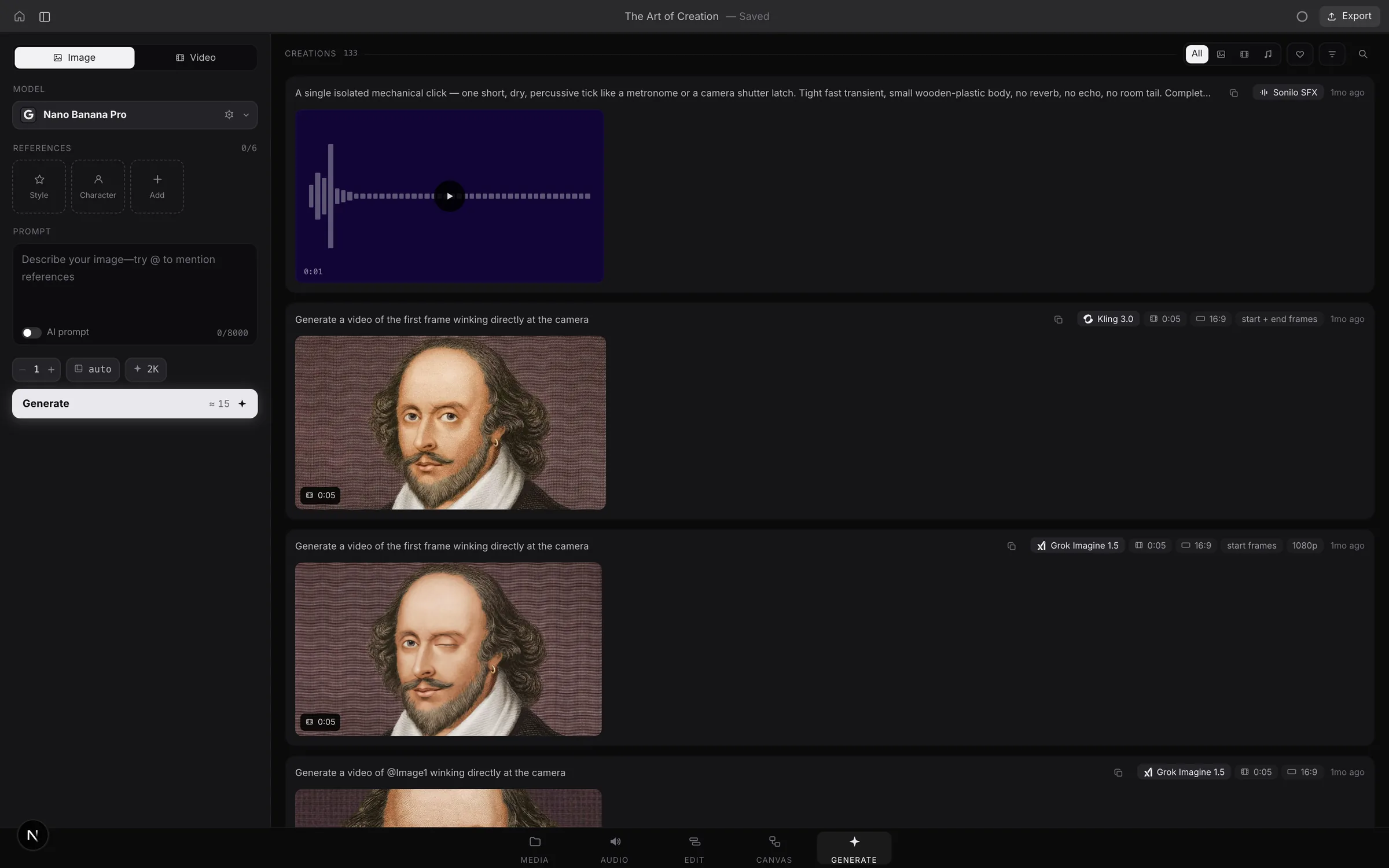
The screenshot above is a real test: the same portrait and prompt run on Kling 3.0 and on Grok Imagine 1.5, landing side by side in one feed. That's the easiest way to choose. Keep the take you like, drop it on the timeline, and add voice or score around it.
Getting good results from Grok Imagine
The still sets the look
Since 1.5 only works from a start image, spend your effort on that frame. Framing, lighting and wardrobe carry straight through into the motion.
Write the line in quotes
If a character should speak, put the exact words in the prompt in quotation marks and say who speaks them. The sound arrives with the picture.
Describe motion, not the scene
The picture already shows the scene. Use the prompt for verbs: "she turns to the window, the camera drifts left, the curtain lifts in the wind".
Draft at 480p
Work out timing and action at 480p, then rerun the winner at 720p. Your settings stay attached to every take on the board, so the rerun is quick.
When another model is the better pick
Grok Imagine 1.5 tops out at 720p and needs a start image. For a 1080p or 4K shot, or one you write from text alone, try Kling 3.0, Veo 3.1 or MiniMax H3.
It also always makes sound. If the shot will sit under narration and you want it silent from the start, a model with a sound switch, such as Kling 3.0 or Seedance 2.5, saves a step. For a long talking-head performance, OmniHuman takes up to a minute of your own audio.
Questions about Grok Imagine
Who makes Grok Imagine?
xAI, the company behind Grok. Grok Imagine first launched in August 2025 inside xAI's Grok apps, and xAI made Grok Imagine Video 1.5 generally available in June 2026.
Can Grok Imagine make a video from text only?
Not in Tenet. Grok Imagine 1.5 is image-to-video here: you give it a start image and describe the motion. You can make that image first with Grok Imagine's image model.
How long are Grok Imagine 1.5 videos?
In Tenet you can choose 4, 5, 6, 8, 10, 12 or 15 seconds, at 480p or 720p.
Do I need a Grok subscription to use Grok Imagine in Tenet?
No. Tenet runs Grok Imagine on Tenet credits, so you don't need a Grok, X or xAI account or API key.
Can I use Grok Imagine output commercially?
You own what you generate in Tenet, and each model's own terms apply to its output. Check xAI's terms for your use, and see Tenet's AI content policy.
The specs above are what Tenet offers, checked against the app on 2026-11-12. Background on Grok Imagine comes from xAI and the press, and can change: xAI: Grok Imagine Video 1.5.